
TLDR; Watch the video at the bottom of this post!
Background on my project
DistinXion uses Hudl Sportscode to record statistics and create highlight videos for their basketball games. As my internship class piloted the data analytics program at DistinXion, they were looking for a way to present data within the organization in the future.
COVID-19 presented some new challenges for the organization when it came to statistic tracking through Sportscode. With two computers in the Bloomington office with the software, remote interns would need to remote access those desktops to complete their work. This presented a bottleneck in our project progression as each intern had to work out issues with their connectivity, and team members would have to take turns doing work.
My goal
I decided to come up with a way to make every intern able to work in parallel so that we could advance in our assignments as quickly as possible. The solution would be something that could be worked on offline, is simple to interact with, and has an output file type compatible with what the organization already works with.
The Process
I worked in Microsoft Excel using VBA to create a user-friendly interface for recording stats.

Clicking on the blue buttons (pictured above) automatically updates the running timeline (pictured below). The timeline is shown so that the user can always keep track of what is coded to catch mistakes.

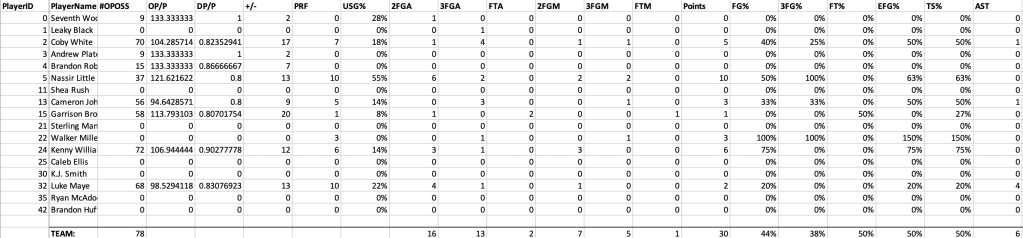
The running timeline is automatically tracked and summarized in live-time by the ‘Output Window’ (pictured below), which presents each player’s game statistics in a format that is immediately readable and has easy exporting capabilities to CSV for data analysis.
The Solution
By coding this workbook in Excel VBA, remotely coding games for statistics became faster and easier for DistinXion. A significant benefit of using Sportscode is being able to extract video highlights for each player, play type, shot type, etc. The Excel workbook I coded does not have this capability, but if they just need a quick way to get stats, this is a great software solution for them. An alternate solution that incorporates both the Excel workbook and Sportscode would be to code in Sportscode ‘just for highlights’ then come back and code for all statistics using Excel. Further, the workbook is a bit simpler to edit in the future. If there is a new statistic they want to be tracked, Excel formulas are easier to execute than coding in Sportscode.
Watch this video of me walking through the program and showing you how it works!
 Brent Claypool